
2.2 KiB
Forward Renderer
This page describes the URP Forward Renderer settings.
The Forward Renderer in URP implements the forward rendering path.
For more information on how URP implements and uses the Forward Renderer, see Rendering in the Universal Render Pipeline.
How to find the Forward Renderer asset
To find the Forward Renderer asset that a URP asset is using:
-
Select a URP asset.
-
In the Renderer List section, click a renderer item or the vertical ellipsis icon (⋮) next to a renderer.
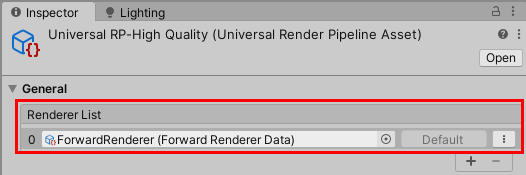
When you create a new project using the Universal Render Pipeline template, the Forward Renderer asset is in the following location:
/Assets/Settings/ForwardRenderer.asset
Forward Renderer asset reference
This section describes the properties of the Forward Renderer asset.
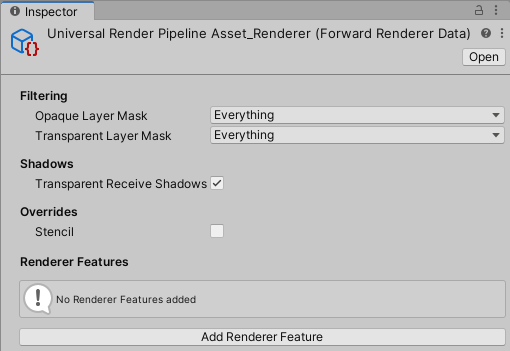
Filtering
This section contains properties that define which layers the renderer draws.
| Property | Description |
|---|---|
| Opaque Layer Mask | Select which opaque layers this Renderer draws |
| Transparent Layer Mask | Select which transparent layers this Renderer draws |
Shadows
This section contains properties related to rendering shadows.
| Property | Description |
|---|---|
| Transparent Receive Shadows | When this option is on, Unity draws shadows on transparent objects. |
Overrides
This section contains Render Pipeline properties that this Renderer overrides.
Stencil
With this check box selected, the Renderer processes the Stencil buffer values.
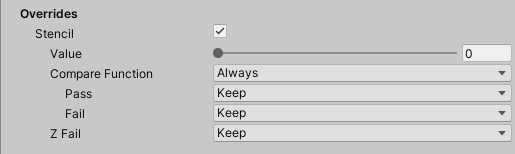
For more information on how Unity works with the Stencil buffer, see ShaderLab: Stencil.
Renderer Features
This section contains the list of Renderer Features assigned to the selected Renderer.
For information on how to add a Renderer Feature, see How to add a Renderer Feature to a Renderer.
URP contains the pre-built Renderer Feature called Render Objects.