
2.9 KiB
Square Wave
Menu Path : Operator > Math > Wave > Square Wave
The Square Wave Operator allows you to generate a value which alternates between a minimum and a maximum value at steady intervals based on a provided input and a set frequency.
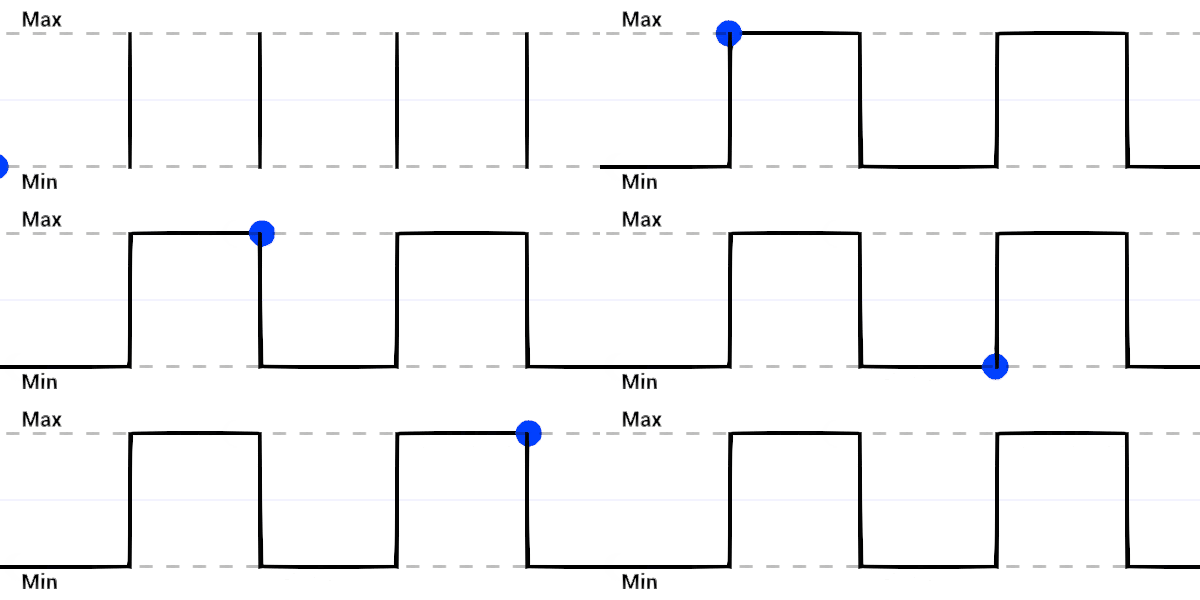
If Frequency is set to 1, the blue dot remains at Min with an Input value from 0 to almost 0.5. Then, with an Input value from 0.5 to almost 1, the dot remains at Max. After that, the wave repeats.
You can use this Operator to instantaneously switch between two values at a steady rate. This can be useful if you want to periodically toggle a behavior on and off. For example, if you want to apply a force at steady intervals.
Operator properties
| Input | Type | Description |
|---|---|---|
| Input | Configurable | The value this Operator evaluates to generate the output value. |
| Frequency | Configurable | The rate at which the Input value switches between Min and Max. Larger values make the wave repeat itself more. |
| Min | Configurable | The minimum value that Out can be. |
| Max | Configurable | The maximum value that Out can be. |
| Output | Type | Description |
|---|---|---|
| Out | Matches Input | The value this Operator generates between Min and Max based the Input and Frequency. |
Operator configuration
To view the Operator's configuration, click the cog icon in the Operator's header.
| Property | Description |
|---|---|
| Input | The value type for the Input port. For the list of types this property supports, see Available types. |
| Frequency | The value type for the Frequency port. For the list of types this property supports, see Available types. |
| Min | The value type for the Min port. For the list of types this property supports, see Available types. |
| Max | The value type for the Max Port. For the list of types this property supports, see Available types. |
Available types
You can use the following types for your Input, Min, and Max ports:
- float
- Vector
- Vector2
- Vector3
- Vector4
- Position
- Direction