
8.2 KiB
8.2 KiB
Experimental: This Feature is currently experimental and is subject to change in later major versions.
Sample Mesh
Menu Path : Operator > Sampling > Sample Mesh
Menu Path : Operator > Sampling > Sample Skinned Mesh
The Sample Mesh or Skinned Mesh Operator allows you to fetch vertex data of a static or skinned geometry.
Operator settings
| Property | Type | Description |
|---|---|---|
| Output | Enum | (Inspector) Select the vertex attributes to read from the vertex. |
| Mode | Enum | The wrap mode to use for the sequence. The options are: • Clamp: Clamps the index between the first and last vertices. • Wrap: Wraps the index around to the other side of the vertex list. • Mirror: Mirrors the vertex list so out of range indices move back and forth through the list. |
| Placement mode | Enum | Specifies which primitive part of the mesh to sample from: • Vertex: Samples positions from all listed vertices. • Edge: Samples from an interpolation between two consecutives vertices that are part of a triangle on the mesh. • Surface: Samples from an interpolation between three vertices that define a triangle on the mesh. |
| Surface coordinates | Enum | Specifies the method this block uses to sample the surface of a triangle. • Barycentric: Samples the surface using raw barycentric coordinates. Using this method, sampled positions are not constrained by the triangle edges which is useful if you have baked a position outside of the Visual Effect Graph. • Uniform: Samples the surface uniformly within the triangle area. This property only appears if you set Placement mode to Surface and Spawn Mode to Custom. |
| Source | Enum | (Inspector) Specifies the kind of geometry to sample from. The options are: • Mesh: Samples from a mesh asset. • Skinned Mesh Renderer: Samples from a Skinned Mesh Renderer. |
Operator Properties
| Input | Type | Description |
|---|---|---|
| Mesh | Mesh | The source mesh asset to sample. This property only appears if you set Source to Mesh |
| Skinned Mesh Renderer | Skinned Mesh Renderer | The source Skinned Mesh Renderer component to sample. This is a reference to a component within the scene. To assign a Skinned Mesh Renderer to this port, create a Skinned Mesh Renderer property in the Blackboard and expose it. This property only appears if you set Source to Skinned Mesh Renderer. |
| Vertex | uint | The index of the vertex to sample. This property only appears if you set Placement mode to Vertex. |
| Index | uint | The start index of the edge to sample from. The block uses this index and the following index to select the line to sample from. This property only appears if you set Placement mode to Edge and Spawn Mode to Custom. |
| Triangle | uint | The index of triangle to sample, assuming the index buffer contains a triangle list. This property only appears if you set Placement mode to Surface, Spawn Mode to Custom, and Spawn Mode to Custom. |
| Edge | float | The interpolation value the block uses to sample along the edge. This is the percentage along the edge, from start position to end position, that the sample position is taken. This property only appears if you set Placement mode to Edge and Spawn Mode to Custom. |
| Barycentric | Vector2 | The raw barycentric coordinate to sample from the triangle at. The input is two-dimensional (X and Y) and the block calculates the Z value using the values you input: Z = 1 - X - Y. This sampling method does not constrain the sampled position inside the triangle edges. This property only appears if you set Placement mode to Surface, Surface coordinates to Barycentric, and Spawn Mode to Custom. |
| Square | Vector2 | The uniform coordinate to sample the triangle at. The block takes this value and maps it from a square coordinate to triangle space. To do this, it uses the method outline in the paper A Low-Distortion Map Between Triangle and Square (Heitz 2019). This property only appears if you set Placement mode to Surface, Surface coordinates to Uniform, and Spawn Mode to Custom. |
| Output | Type | Description |
|---|---|---|
| Position | Vector3 | The vertex attribute Position This property only appears if you select Position in Output |
| Normal | Vector3 | The vertex attribute Normal This property only appears if you select Normal in Output |
| Tangent | Vector3 | The vertex attribute Tangent This property only appears if you select Tangent in Output |
| Color | Vector4 | The vertex attribute Color This property only appears if you select Color in Output |
| TexCoord0-7 | Vector4 | The vertex attribute TexCoord 0 to 7. For unspecified dimensions, this is 0. This property only appears if you select TexCoord0-7 in Output |
| BlendWeight | Vector4 | The vertex attribute BlendWeight. This property only appears if you select BlendWeight in Output |
| BlendIndices | Vector4 | The vertex attribute BlendIndices. This property only appears if you select BlendIndices in Output |
Limitations
The Mesh sampling feature has the following limitations:
- It only supports VertexAttributeFormat.Float32 for all VertexAttributes except Color, which has to be a four component attribute using either VertexAttributeFormat.UInt8 or VertexAttributeFormat.Float32 format.
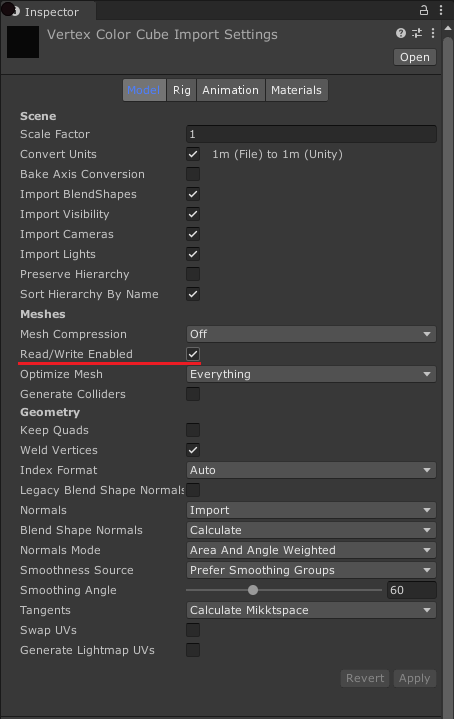
- If a Mesh is not readable, the Position (Mesh) Block and Sample Mesh Operator return zero values when they attempt to sample from it. For information on how to make a Mesh readable, see Model import settings.
Reference list
- Heitz, Eric. 2019. "A Low-Distortion Map Between Triangle and Square". hal-02073696v2