
5.1 KiB
Eye Shader
The Eye Shader is your starting point for rendering eyes in the High Definition Render Pipeline (HDRP). Use it to exhibit important phenomena like cornea refraction, caustics, pupil dilation, limbal darkening, and subsurface scattering to bring your characters to life.

Under the hood, the Eye shader is a pre-configured Shader Graph. To learn more about the Eye shader implementation, or to create your own Eye shader variant, see the Shader Graph documentation about the Eye Master Stack.
Eye anatomy
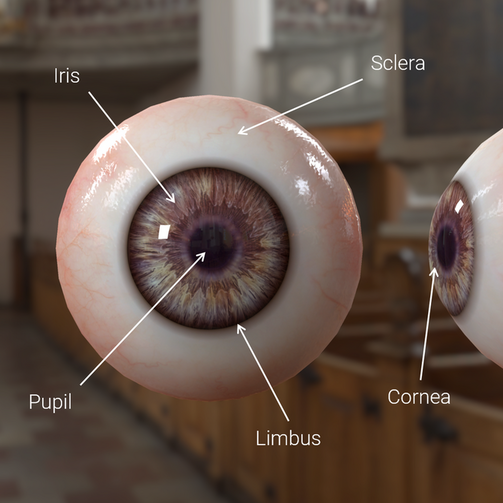
When rendering eyes, it’s helpful to become familiar with their actual biological structure to produce a realistic outcome.
- The Iris is the flat, colored, ring that surrounds the Pupil. It sits underneath the Cornea.
- The Cornea is the transparent lens on top of the Iris. It reflects and focuses light into the Pupil.
- The Pupil is the opening in the Iris that allows light to pass into the eye and reach the retina.
- The Limbus, or the Limbal Ring, is the darkened bordering region between the Cornea and the Sclera.
- The Sclera is the opaque, protective outer layer of the eye. Authoring Eye Maps
Authoring eye maps
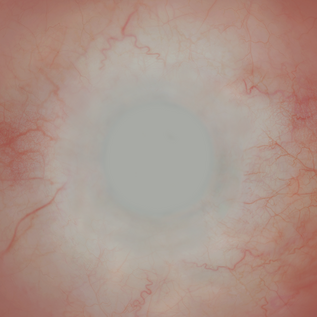
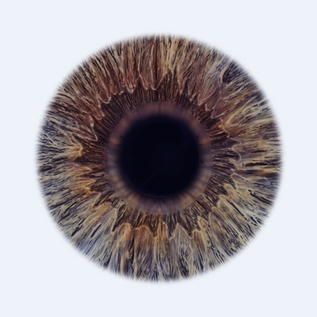
It’s important to note that due to how properties for subsurface scattering, limbal ring, smoothness, and other surface information blends between the Iris and Sclera, you must provide their respective maps separately. In practice, this means you provide a Sclera map that with no Iris information, and an Iris map with no Sclera information.
Creating an Eye Material
New Materials in HDRP use the Lit Shader by default. To create a Hair Material from scratch, create a Material and then make it use the Hair Shader. To do this:
- In the Unity Editor, navigate to your Project's Asset window.
- Right-click the Asset Window and select Create > Material. This adds a new Material to your Unity Project’s Asset folder.
- Click the Shader drop-down at the top of the Material Inspector, and select HDRP > Eye.
Properties
Exposed Properties
| Property | Description |
|---|---|
| Sclera Map | Assign a Texture that controls color of the Sclera. |
| Sclera Normal Map | Assign a Texture that defines the normal map for the Sclera. |
| Sclera Normal Strength | Modulates the Sclera normal intensity between 0 and 8. |
| Iris Map | Assign a Texture that controls color of the eye’s Iris. |
| Iris Normal Map | Assign a Texture that defines the normal map for the eye’s Iris. |
| Iris Normal Strength | Modulates the Iris’ normal intensity between 0 and 8. |
| Iris Clamp Color | Sets the color that will be used if the refraction ray reached the inside of the Cornea |
| Pupil Radius | Sets the radius of the Pupil in the Iris Map as a percentage. |
| Pupil Debug Mode | When enabled, displays a debug mode that allows you to calibrate the desired Pupil Radius for your Iris Map. For proper calibration, ensure that the Iris Offset is 0, the Pupil Aperture is 0.5 (the neutral position) and then the white circle must be strictly inside your iris pattern. See the following screenshot for an example: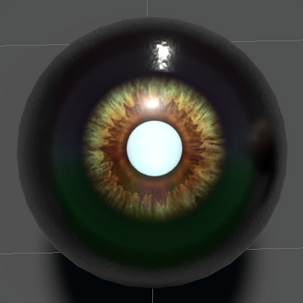 |
| Pupil Aperture | Sets the state of the pupil’s aperture, 0 being the smallest aperture (Min Pupil Aperture) and 1 the widest aperture (Max Pupil Aperture). |
| Min Pupil Aperture | Sets the minimum pupil aperture value. |
| Max Pupil Aperture | Sets the maximum pupil aperture value. |
| Sclera Smoothness | Sets the smoothness of the Sclera. |
| Cornea Smoothness | Sets the smoothness of the Cornea. |
| Iris Offset | Sets the offset of the Iris placement, useful since real world eyes are never symmetrical and centered. |
| Limbal Ring Size Iris | Sets the relative size of the Limbal Ring in the Iris. |
| Limbal Ring Size Sclera | Sets the relative size of the Limbal Ring in the Sclera. |
| Limbal Ring Fade | Sets the fade out strength of the Limbal Ring. |
| Limbal Ring Intensity | Sets the darkness of the Limbal Ring. |
| Iris Diffusion Profile | Sets a Diffusion Profile, controlling the Subsurface Scattering properties of the Iris. |
| Sclera Diffusion Profile | Sets a Diffusion Profile, controlling the Subsurface Scattering properties of the Sclera. |