
1.9 KiB
1.9 KiB
Raytracing Quality Keyword
The Raytracing Quality Keyword allows you to provide a fast implementation of your Shader Graph to be use with ray-traced effects to tradeoff accuracy for speed, with the exception of Path-Traced effect which will not be affected and use the default path.
Adding the Raytracing Quality Keyword
The Raytracing Quality Keyword is a Built-in Keyword. To add the Raytracing Quality Keyword to the graph:
- In the Blackboard, click the plus (**+**) button.
- Select Keyword > Raytracing Quality. This creates the keyword and makes it visible on the Blackboard.
Using the Raytracing Quality Keyword
To use this keyword in the graph, create a Keyword Node by dragging the Raytracing Quality Keyword from the Blackboard to the graph or opening the Create Node Menu and searching for Raytracing Quality .
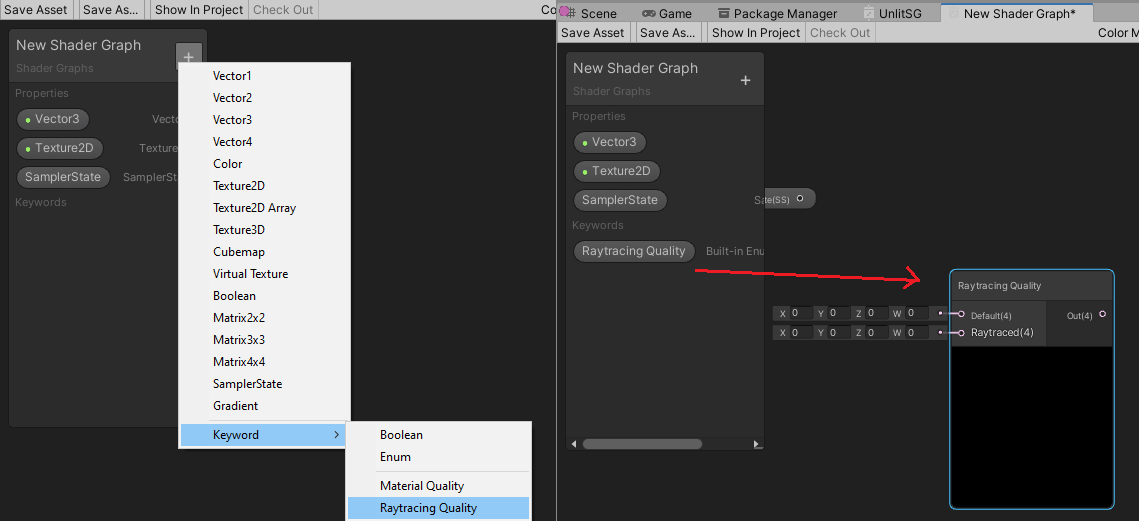
Available Ports
| Name | Direction | Type | Description |
|---|---|---|---|
| default | Input | Vector4 | The value to use for the normal Shader Graph. This is the default path Unity uses to render this Shader Graph. |
| raytraced | Input | Vector4 | The value to use for the fast Shader Graph to use with the ray-traced effects excepth the path traced one. |
| output | Output | Vector4 | Outputs is the value which will be selected based on the context this shader graph is used. |