Draft: The content on this page is complete, but it has not been reviewed yet.
Experimental: This feature is currently experimental and is subject to change in later major versions. To use this feature, enable Experimental Operators/Blocks in the Visual Effects tab of your Project's Preferences.
# Point Cache Bake Tool
The Point Cache Bake Tool is an Utility Window that enables generating [Point Cache](PointCaches.md) Assets from Geometric Data or Textures. It provides basic functionality to scatter points and get attributes from the inputs.
## Opening the Tool
The Point Cache Bake Tool Window is accessible through the menu :
**Window > Visual Effects > Utilities > Point Cache Bake Tool**
## Using the Tool
The tool window prompts with two **Bake Modes** at the top :
* **Mesh** : Baking point cache from a geometry.
* **Texture** : Baking point cache from a texture.
### Baking from Mesh
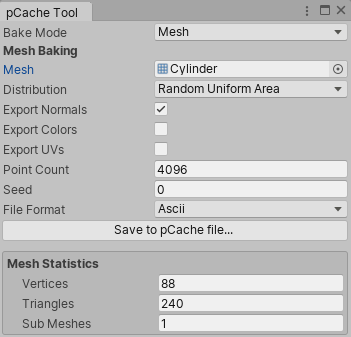
When using Mesh baking mode. The window displays the following Mesh Baking properties :
* **Mesh** (Mesh) : The Mesh object to use for the Baking
* **Distribution** (Enum): The Point Scattering technique used.
* Sequential : Will Spawn a point on each primitive or vertex, sequentially
* Random : Will Spawn a point randomly on each primitive or vertex, without taking primitive area into account.
* Random Uniform Area : Will Spawn a point randomly on each primitive, while taking primitive area into account.
* **Bake Mode** (Enum) : (Only when using Sequential/Random Distributions) Allows to select per-Vertex or per-Triangle.
* **Export Normals** (bool) : Whether to export the normals into the point cache
* **Export Colors** (bool) : Whether to export the vertex colors into the point cache
* **Export UVs** (bool) : Whether to export the UVs into the point cache
* **Point Count** (uint) : The output point count
* **Seed** (uint) : The random seed used for this generation
* **File Format** (Enum) : The format (Ascii or Binary) used for encoding
After Setting a Mesh into the Mesh Property, The following UI becomes visible:
* **Save to pCache file...** (Button): Clicking this button will prompt you a Save File dialog in order to save the computed point cache to an Asset.
* **Mesh Statistics** (Group): Statistics about the Geometry File
* Vertices : the vertex count
* Triangles : the triangle count
* Sub Meshed : the number of sub-meshes contained in the geometry
### Baking from Texture
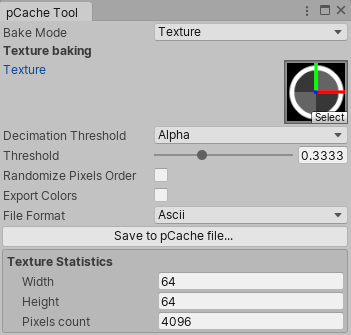
When using Texture baking mode. The window displays the following Mesh Baking properties :
- **Texture** (Texture) : The 2D Texture object to use for the Baking
- **Decimation Threshold** (Enum): The decimation threshold mode used.
- Alpha : Use the alpha Channel
- Luminance : Use the luminance of the combined RGB channels
- R : Use the red Channel
- G : Use the green Channel
- B : Use the blue Channel
- **Threshold** (float) : The threshold value used to decimate points (if the corresponding value is inferior to the threshold property)
- **Randomize Pixel Order** (bool) : Randomize Points instead of sorting them by pixel row/column.
- **Export Colors** (bool) : Whether to export the colors into the point cache
- **File Format** (Enum) : The format (Ascii or Binary) used for encoding
After Setting a Texture into the Mesh Property, The following UI becomes visible:
- **Save to pCache file...** (Button): Clicking this button will prompt you a Save File dialog in order to save the computed point cache to an Asset.
- **Texture Statistics** (Group): Statistics about the Texture File
- Width: the width (in pixels) of the texture
- Height: the height (in pixels) of the texture
- Pixels Count : the number pixels (width * height) of the texture