# Cellular Noise
Menu Path : **Operator > Noise > Cellular Noise**
The **Cellular Noise** Operator allows you to specify coordinates to sample a noise value within a specified range in one, two, or three dimensions. Cellular noise (also known as “Worley noise”) creates distinct cell-like patterns. To do this, it scatters random points then calculates the distance between the nearest ones.
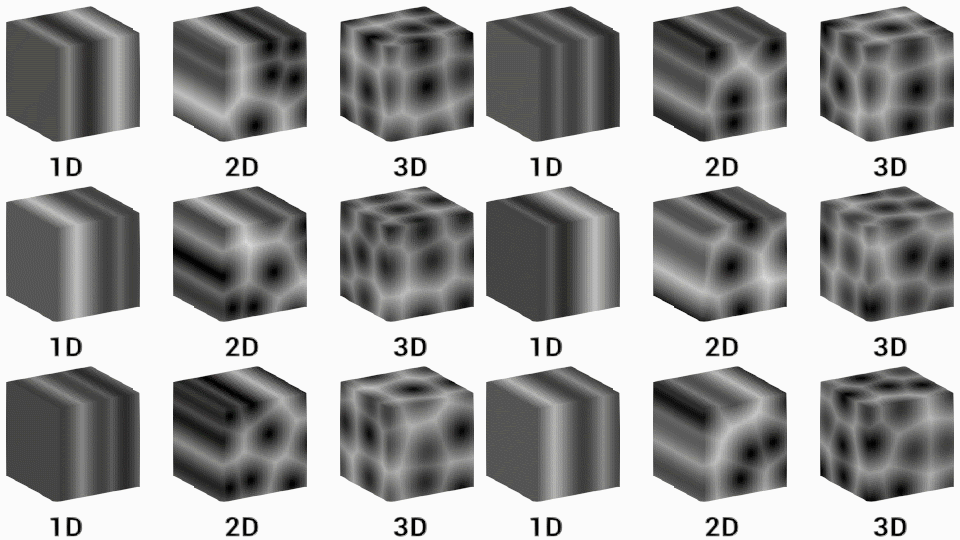
You can use this Operator to introduce variety to your particle attributes. A common use case is to use each particle’s position as a coordinate to sample the noise to output a new color, velocity, or position value.
## Operator settings
| **Property** | **Type** | **Description** |
| -------------- | -------- | ------------------------------------------------------------ |
| **Dimensions** | Enum | Specify whether the noise is one, two, or three dimensional. |
| **Type** | Enum | Specify what type of noise to use. |
## Operator properties
| **Input** | **Type** | **Description** |
| -------------- | ----------------------------- | ------------------------------------------------------------ |
| **Coordinate** | Float
Vector2
Vector3 | The coordinate in the noise field to sample from.

The **Type** changes to match the number of **Dimensions**. |
| **Frequency** | Float | The period in which Unity samples the noise. A higher frequency results in more frequent noise change.
 |
| **Octaves** | Int | The number of layers of noise. More octaves create a more varied look but are also more resource-intensive to calculate.
 |
| **Roughness** | Float | The scaling factor Unity applies to each octave. Unity only uses roughness when **Octaves** is set to a value higher than 1.
 |
| **Lacunarity** | Float | The rate of change of the frequency for each successive octave. A lacunarity value of 1 results in each octave having the same frequency.
 |
| **Range** | Vector2 | The range within which Unity calculates the noise. The noise stays between the X and Y value you specify here, where X is the minimum and Y is the maximum.
 |
| **Output** | **Type** | **Description** |
| --------------- | ----------------------------- | ------------------------------------------------------------ |
| **Noise** | Float | The noise value at the coordinate you specify. |
| **Derivatives** | Float
Vector2
Vector3 | The rate of change of the noise for every dimension.
The **Type** changes to match the number of **Dimensions**. |