# Collide with Depth Buffer
Menu Path : **Collision > Collide with Depth Buffer**
The **Collide with Depth Buffer** Block makes particles collide with a specific Camera’s depth buffer. This is especially useful for fast moving particles like sparks or rain drops where precise collision is not as important.
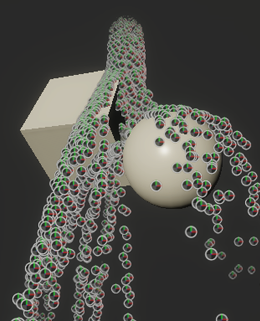
**Important:** For the block to generate depth collision, the specified Camera must be enabled and the Game view must be visible.
## Block compatibility
This Block is compatible with the following Contexts:
- [Update](Context-Update.md)
## Block settings
| **Setting** | **Type** | **Description** |
| --------------------- | -------- | ------------------------------------------------------------ |
| **Camera** | Enum | The method to decide which Camera to use to calculate depth collision. The options are:
• **Main**: Uses the main Camera in the Scene. This requires a Camera in the Scene to have the **MainCamera** tag.
• **Custom**: Allows you to specify a particular Camera to use. |
| **Surface Thickness** | Enum | The method to decide how to specify the thickness of the colliding surface. The options are:
• **Infinite**: Sets the thickness of the colliding surface to be infinite.
• **Custom**: Allows you to specify a particular thickness value. |
| **Radius Mode** | Enum | The mode that determines the collision radius of each particle. The options are:
• **None**: Particles have a radius of zero.
• **From Size**: Particles inherit their radius from their individual sizes.
• **Custom**: Allows you to set the radius of the particles to a specific value. |
| **Rough Surface** | Bool | Toggles whether or not the collider simulates a rough surface. When enabled, Unity adds randomness to the direction in which particles bounce back to simulate collision with a rough surface. |
## Block properties
| **Input** | **Type** | **Description** |
| --------------------- | -------- | ------------------------------------------------------------ |
| **Bounce** | Float | The amount of bounce to apply to particles after a collision. A value of 0 means the particles do not bounce. A value of 1 means particles bounce away with the same speed they impacted with. |
| **Friction** | Float | The speed that particles lose during collision. The minimum value is 0. |
| **Lifetime Loss** | Float | The proportion of life a particle loses after collision. |
| **Roughness** | Float | The amount to randomly adjust the direction of a particle after it collides with the surface.
This property only appears when you enable **Rough Surface**. |
| **Radius** | Float | The radius of the particle this Block uses for collision detection.
This property only appears when **Radius Mode** is set to **Custom**. |
| **Camera** | Camera | The Camera to use for generating the collision surface. This Block uses the depth buffer from this Camera to generate the collision surface.
This property only appears when **Camera** is set to **Custom**. |
| **Surface Thickness** | Float | The thickness of the collision surface.
This property only appears when **Surface Thickness** is set to **Custom**. |