# Gradient Sky
The Gradient Sky Volume component override controls settings relevant to rendering a simple representation of the sky. It allows you to define three colors, the **Top**, **Middle**, and **Bottom**, which HDRP interpolates between to create a gradient sky.
You can alter these values at runtime. This component also exposes options that enable you to define how HDRP updates the indirect lighting the sky generates in the Scene.
## Using Gradient Sky
**Gradient Sky** uses the [Volume](Volumes.md) framework, so to enable and modify **Gradient Sky** properties, you must add a **Gradient Sky** override to a [Volume](Volumes.md) in your Scene. To add **Gradient Sky** to a Volume:
1. In the Scene or Hierarchy view, select a GameObject that contains a Volume component to view it in the Inspector.
2. In the Inspector, navigate to **Add Override > Sky** and click on **Gradient Sky**.
After you add a **Gradient Sky** override, you must set the Volume to use **Gradient Sky**. The [Visual Environment](Override-Visual-Environment.md) override controls which type of sky the Volume uses. In the **Visual Environment** override, navigate to the **Sky** section and set the **Type** to **Gradient Sky**. HDRP now renders a **Gradient Sky** for any Camera this Volume affects.
[!include[](snippets/volume-override-api.md)]
## Properties
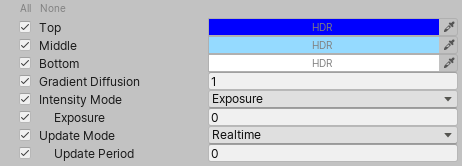
[!include[](snippets/Volume-Override-Enable-Properties.md)]
| Property | Description |
| ---------------------- | ------------------------------------------------------------ |
| **Top** | Use the color picker to select the color of the upper hemisphere of the sky. |
| **Middle** | Use the color picker to select the color of the horizon. |
| **Bottom** | Use the color picker to select the color of the lower hemisphere of the sky. This is below the horizon. |
| **Gradient Diffusion** | Set the size of the **Middle** property in the Skybox. Higher values make the gradient thinner, shrinking the size of the **Middle** section. Low values make the gradient thicker, increasing the size of the **Middle** section. |
| **Intensity Mode** | Use the drop-down to select the method that HDRP uses to calculate the sky intensity.
• **Exposure**: HDRP calculates intensity from an exposure value in EV100.
• **Multiplier**: HDRP calculates intensity from a flat multiplier. |
| - **Exposure** | Set the amount of light per unit area that HDRP applies to the HDRI Sky cubemap.
This property only appears when you select **Exposure** from the **Intensity Mode** drop-down. |
| - **Multiplier** | Set the multiplier for HDRP to apply to the Scene as environmental light. HDRP multiplies the environment light in your Scene by this value.
This property only appears when you select **Multiplier** from the **Intensity Mode** drop-down. |
| **Update Mode** | Use the drop-down to set the rate at which HDRP updates the sky environment (using Ambient and Reflection Probes).
• **On Changed**: HDRP updates the sky environment when one of the sky properties changes.
• **On Demand**: HDRP waits until you manually call for a sky environment update from a script.
• **Realtime**: HDRP updates the sky environment at regular intervals defined by the **Update Period**. |
| - **Update Period** | Set the period (in seconds) for HDRP to update the sky environment. Set the value to 0 if you want HDRP to update the sky environment every frame. This property only appears when you set the **Update Mode** to **Realtime**. |