# Point Cache Bake Tool
The Point Cache Bake Tool is a utility that enables you to bake Point Caches to use in visual effects that rely on complex geometry. The tool takes an input [Mesh](https://docs.unity3d.com/Manual/class-Mesh.html) or [Texture2D ](https://docs.unity3d.com/ScriptReference/Texture2D.html)and generates a [Point Cache asset](point-cache-asset.md) representation of it which you can use in a visual effect.
For information on what Point Caches are and what you can use them for, see [Point Caches in the Visual Effect Graph](point-cache-in-vfx-graph.md).
The Point Cache Bake Tool uses a window interface that specifies the input Mesh/Texture2D as well as various properties that control the output Point Cache. To open the Point Cache Bake Tool window, click **Window > Visual Effects > Utilities > Point CacheBake Tool**.
## Working with the Point Cache Bake Tool window
The Point Cache Bake Tool has two bake modes:
- **Mesh**: Bakes a Point Cache from an input Mesh asset.
- **Texture**: Bakes a Point Cache from an input Texture2D asset.
Depending on which mode you select, the window displays different properties to control the baking process. After you specify the input Mesh/Texture2D and set up the properties, click **Save to pCache file…** to bake the Point Cache and save the result to a Point Cache asset.
## Properties
### Common
These properties appear in the Inspector regardless of the **Bake Mode** you select.
| **Property** | **Description** |
| --------------- | ------------------------------------------------------------ |
| **Bake Mode** | Specifies the type of input to bake a Point Cache from. The options are:
• **Mesh**: Bakes a Point Cache from an input Mesh asset.
• **Texture**: Bakes a Point Cache from an input Texture2D asset. |
| **Seed** | The random seed to use for Point Cache generation. |
| **File Format** | Specifies the format to encode the Point Cache with. The options are:
• **Ascii**: Uses Ascii encoding.
• **Binary**: Uses binary encoding. |
### Mesh Baking
This section only appears if you set **Bake Mode** to **Mesh**.

*Point Cache Bake Tool's Mesh Baking section in the Inspector.*
| **Property** | **Description** |
| ------------------ | ------------------------------------------------------------ |
| **Mesh** | The Mesh to produce a Point Cache representation of. |
| **Distribution** | Specifies the point scattering technique the Point Cache Bake Tool uses to sample the input Mesh. The options are:
• **Sequential**: Creates a point at each triangle/vertex sequentially.
• **Random**: Creates a point at each triangle/vertex randomly. If **Bake Mode** is set to **Triangle**, this option does not take the area of the triangle into account.
• **Random Uniform Area**: Creates a point at each triangle randomly. This option takes the area of the triangle into account. |
| **Bake Mode** | Specifies how to bake the Mesh. The options are:
• **Vertex**: Bakes the Mesh on a per-vertex basis.
• **Triangle**: Bakes the Mesh on a per-triangle basis.
This property only appears if you set **Distribution** to **Sequential** or **Random**. If you set **Distribution** to **Random Uniform Area**, this property disappears and uses **Triangle** implicitly. |
| **Export Normals** | Indicates whether to export vertex normal data to the Point Cache. |
| **Export Colors** | Indicates whether to export vertex color data to the Point Cache. |
| **Exports UVs** | Indicates whether to export vertex UV data to the Point Cache. |
| **Point Count** | The number of points to create for the Point Cache. |
| **Seed** | See [Common](#common). |
| **File Format** | See [Common](#common). |
#### Mesh Statistics
This section of the window only appears if you assign a Mesh asset to the **Mesh** property. It contains information about the input Mesh.
| **Statistic** | **Description** |
| -------------- | ------------------------------------------------- |
| **Vertices** | The number of vertices the input Mesh contains. |
| **Triangles** | The number of triangles the input Mesh contains. |
| **Sub Meshes** | The number of sub-meshes the input Mesh contains. |
### Texture Baking
This section only appears if you set **Bake Mode** to **Texture**.
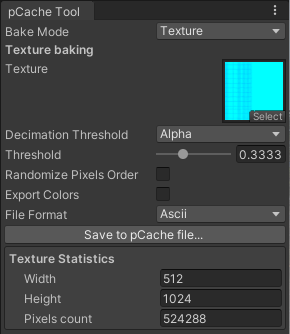
*Point Cache Bake Tool's Texture Baking section in the Inspector.*
| **Property** | **Description** |
| -------------------------- | ------------------------------------------------------------ |
| **Texture** | The Texture2D to produce a Point Cache representation of. |
| **Decimation Threshold** | Specifies the method that selects which of the Texture2D's pixels to ignore during the baking process. The options are:
• **None**: Does not ignore any pixels.
• **Alpha**: Uses the alpha channel.
• **Luminance**: Uses the luminance of the combined RGB channels.
• **R**: Uses the red channel.
• **G**: Uses the green channel.
• **B**: Uses the blue channel. |
| **Threshold** | The threshold that determines which pixels to ignore during the baking process. The Point Cache Bake Tool ignores pixels with a value lower than this.
This property only appears if you set **Decimation Threshold** to a value other than **None**. |
| **Randomize Pixels Order** | Indicates whether to randomize points instead of sorting them by pixel row/column. |
| **Seed** | See [Common](#common).
This property only appears if you enable **Randomize Pixels Order**. |
| **Export Colors** | Indicates whether to export the Texture's color data to the Point Cache. |
| **File Format** | See [Common](#common). |
#### Texture Statistics
This section of the window only appears if you assign a Texture2D asset to the **Texture** property. It contains information about the input Texture.
| **Statistic** | **Description** |
| ---------------- | ------------------------------------------------------------ |
| **Width** | The width of the input Texture2D in pixels. |
| **Height** | The height of the input Texture2D in pixels. |
| **Pixels Count** | The total number of pixels the input Texture2D contains. This is equal to the width of the Texture2D multiplied by the height of the Texture2D. |